
 1300 039 390
You can apply to use your funds in Court to buy a motor vehicle if you need one for your transport.
You need to give us a complete driver history report for every person who would drive the vehicle.
In Victoria, you can get this report from VicRoads. You can order your report on the VicRoads website, over the phone or in person at a VicRoads customer service centre.
How much will it cost?
You can see how much the report will cost on the Driver history report fees page of the VicRoads website. In 2026, the report costs $21.90 plus a card payment fee. You can apply to be reimbursed from your funds in Court.
How to get the report
You can get the report:
- on the VicRoads website
- over the phone
- in person.
Click on the headings below for step-by-step guides.
You will need:
- your driver licence or learner permit details
- a VISA or MasterCard
- your mobile phone
- a device to access the VicRoads website.
You will also need a myVicRoads account. If you do not have one, we have a step-by-step guide below that shows you how to set one up.
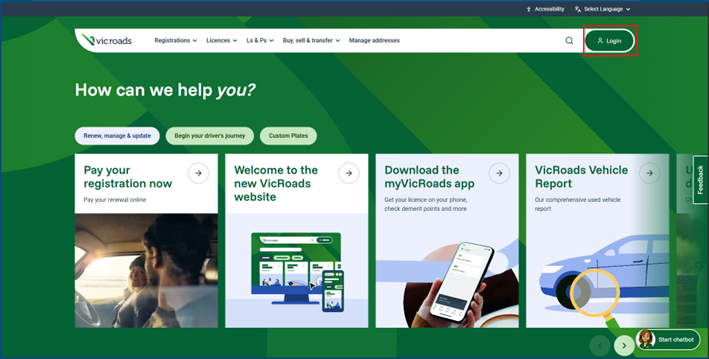
Open the VicRoads website www.vicroads.vic.gov.au. Click ‘Login’ on the top right of the screen.
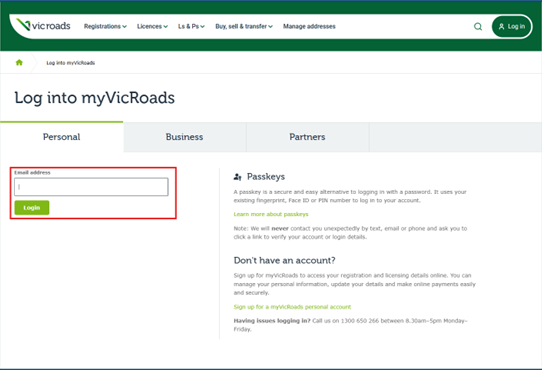
The log in window will appear. Enter your email address, then click ‘Login’.
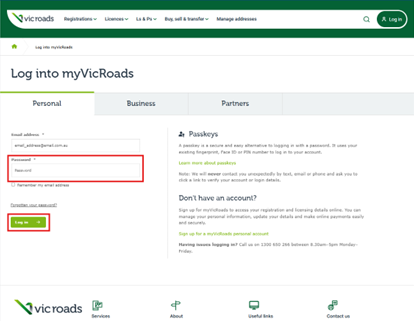
Enter your password or passkey, then click ‘Log in’.
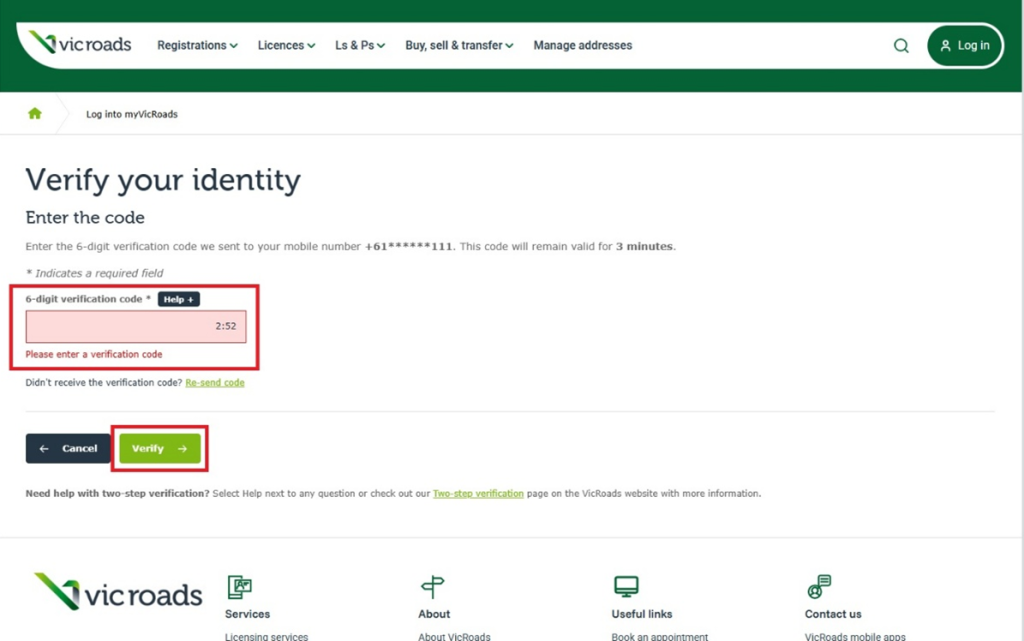
The ‘Verify your identity’ screen will appear. You will get a text message with a verification code. Type the code into the box, then click ‘Verify’.
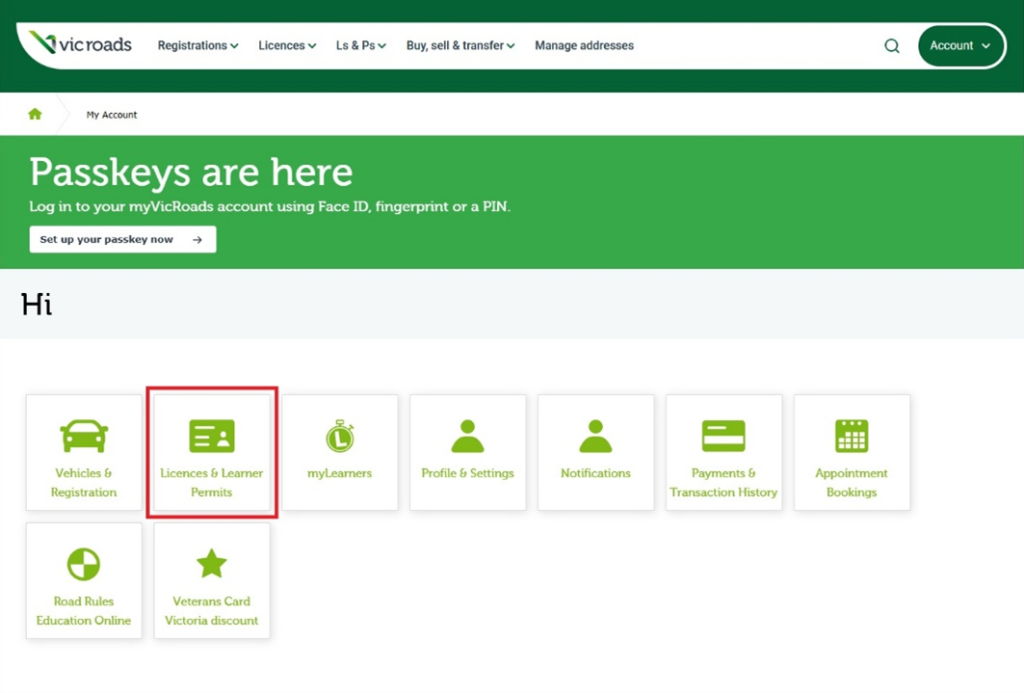
Your myVicRoads screen will appear. Click on ‘Licences & Learner Permits’.
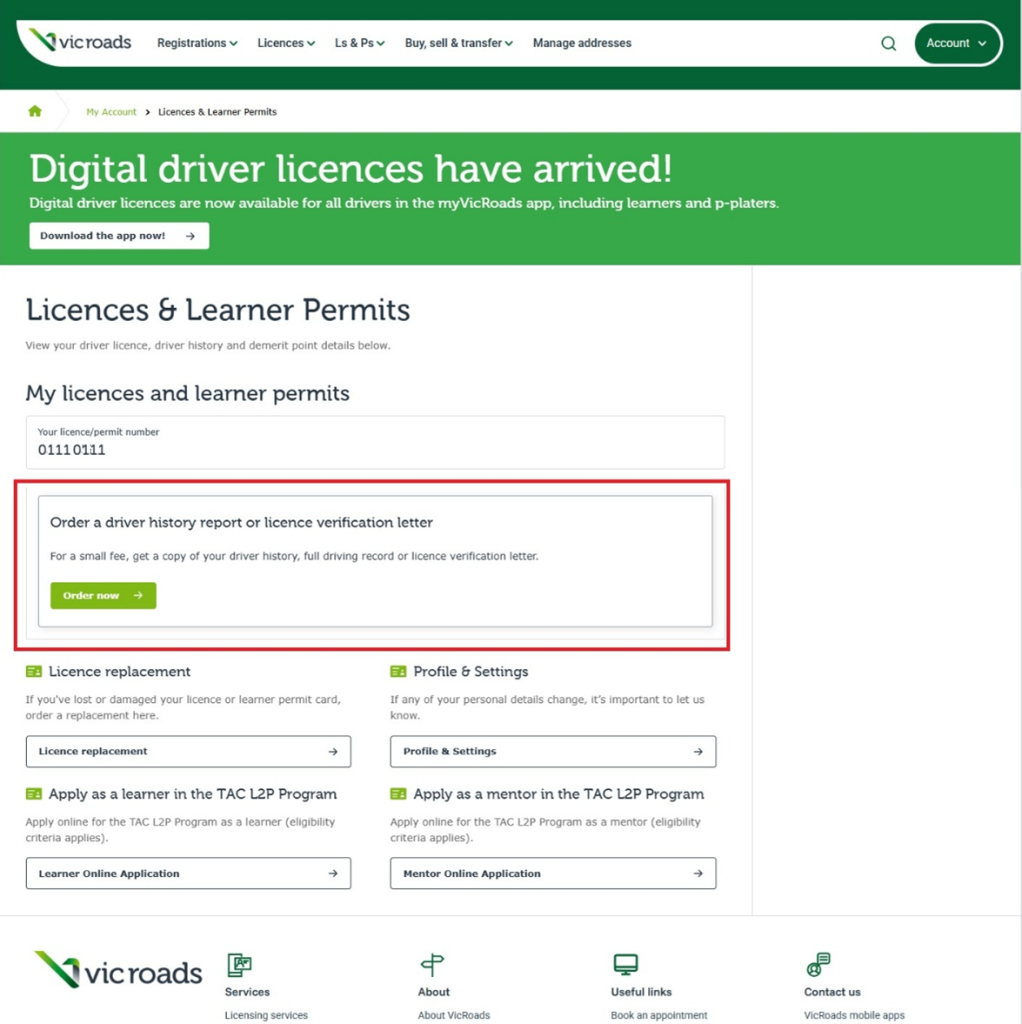
The ‘Licences & Learner Permits’ page will appear. Scroll down to find the option to ‘Order a driver history report or licence verification letter’. Click on ‘Order now’.
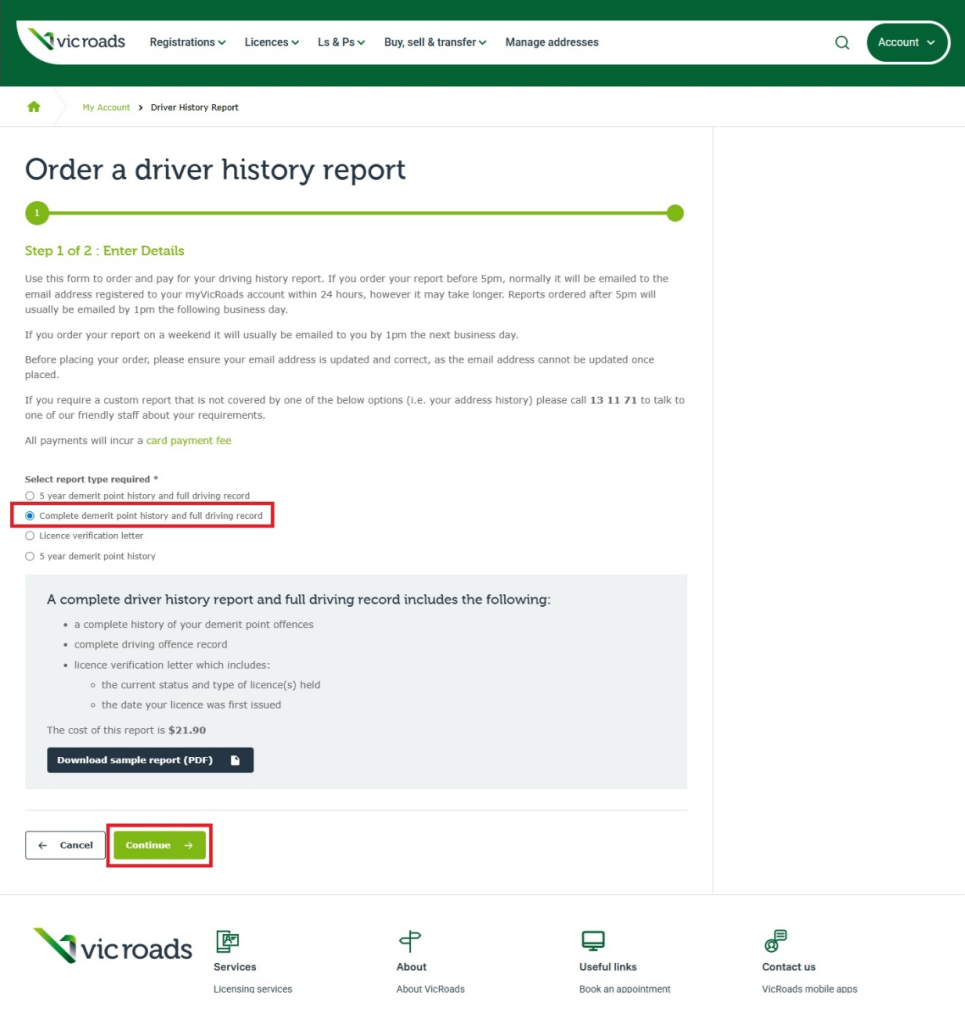
The ‘Order a driver history report’ page will appear. Scroll down to the ‘Select report type required’ question. Click on ‘Complete demerit point history and full driving record’. Click ‘Continue’.
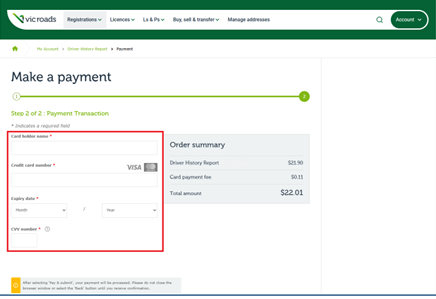
The ‘Make a payment’ screen will appear. Enter your card details. Click ‘Pay & submit’.
The ‘Your order has been received’ screen will appear. You will get a reference number that you may want to write down.
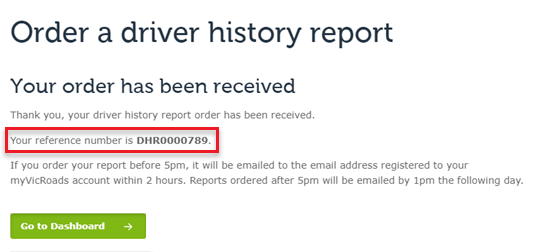
An email with the complete driver history report will be sent to the email address listed on your myVicRoads account.
Please wait for 24 hours for this email to arrive.
If you have not got the email, please check your spam and junk folders.
If you still have not got the email, please call VicRoads on 13 11 71 or visit a customer service centre.
When you have the email, please send the complete driver history report to your Client Services Officer at requests@fundsincourt.vic.gov.au.
To create a myVicRoads account, you will need:
- your driver licence, learner permit or marine licence if you have one
- the registration number of your vehicle if you already have a vehicle
- a device to access the VicRoads website.
Open the VicRoads website www.vicroads.vic.gov.au. Click ‘Login’ on the top right of the screen.
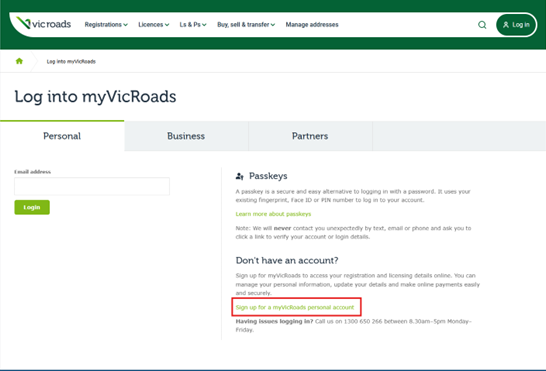
The log in window will appear. Click ‘Sign up for a myVicRoads account’.
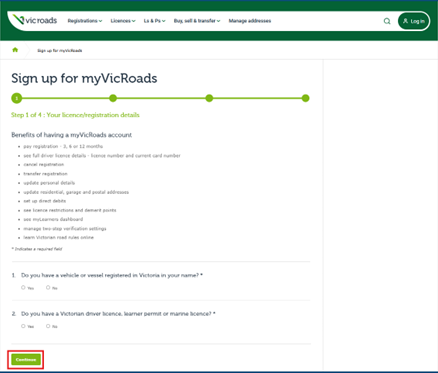
The ‘Sign up for myVicRoads’ page will appear. Answer the questions on the screen, then click ‘Continue’.
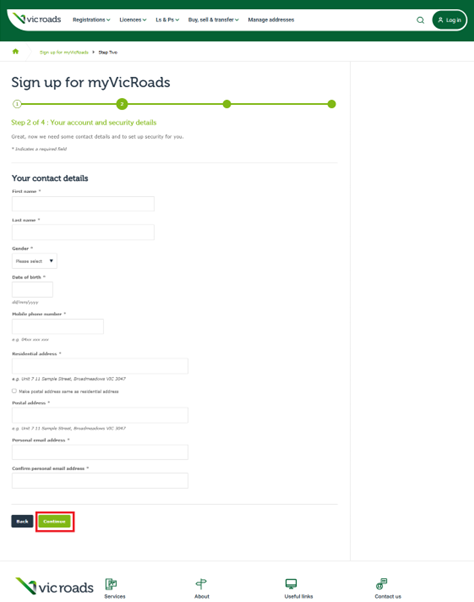
The Step 2 screen will appear. Fill in your contact details, then click ‘Continue’.
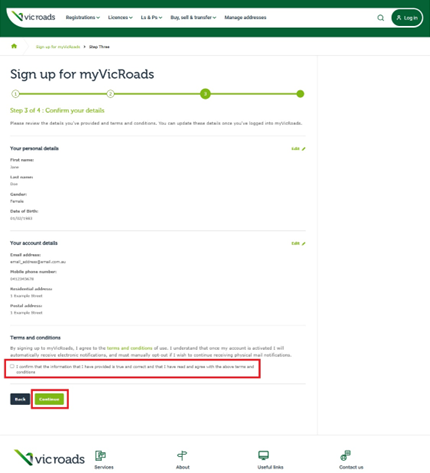
The Step 3 screen will appear. Check that your details are correct. Then, tick the box in the ‘Terms and conditions’ section, then click ‘Continue’.
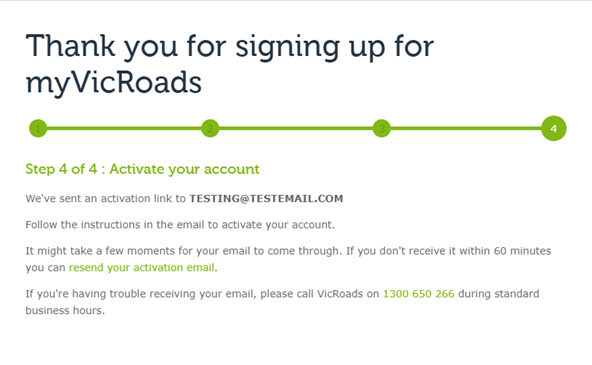
The Step 4 screen will appear. VicRoads will send you an email that has a link. You need to click on this link to set your password.
You will need:
- your driver licence or learner permit details
- a VISA or MasterCard.
Call 13 11 71, or if you are outside Australia, call +61 3 7073 9600. The call centre is open from 8am to 5.30pm Monday to Friday or from 8.30am to 12.30pm Saturday, Australian Eastern Standard Time or Australian Eastern Daylight Savings Time.
Ask for a ‘complete driver history and full driving record’.
Interpretation and translation services
Visit the Using an interpreter or translator page on the VicRoads website to learn more about their translation services.
National Relay Service (NRS)
If you are d/Deaf, hard of hearing, or have a speech/communication difficulty, please contact VicRoads by:
- Contacting VicRoads through your preferred NRS call channel detailed on NRS call numbers and links.
- Provide the NRS with the VicRoads phone number 13 11 71.
You can find more information on the National Relay Service website.
Translationz
Call (03) 8400 0044 from 8.30am to 5pm Monday to Friday.
LanguageLoop
Call(03) 9280 0783 from 8.30am to 5pm Monday to Friday.
You will need:
- your driver licence or learner permit details
- a VISA, MasterCard, cheque or cash.
Use the ‘Visit us’ page www.vicroads.vic.gov.au/contact-us/officelocations on the VicRoads website to find your nearest customer service centre.
This page shows the address and opening times for each centre.
Ask for a ‘complete driver history and full driving record’.
Can you get a report for someone else?
You may be able to get a complete driver history report for someone else if you have their consent to access their personal information. For example, you may have power of attorney for that person. You can find out more on the Requesting information page of the VicRoads website.
What do you do if you live outside Victoria?
If you live outside Victoria, you need to get the complete driver history report from your state’s licencing authority.
The driver history report needs to include:
- a licence verification letter
- a complete demerit point extract
- a driver offence record.